[Bashmatica!] Claude Told Him To Run terraform-destroy
It wiped his entire production stack. The real lesson wasn't the command.
How Marketers Are Scaling With AI in 2026
61% of marketers say this is the biggest marketing shift in decades.
Inside you’ll discover:
Results from over 1,500 marketers centered around results, goals and priorities in the age of AI
Stand out content and growth trends in a world full of noise
How to scale with AI without losing humanity
Where to invest for the best return in 2026
Get Your Report
Confidently Wrong is No Help at All
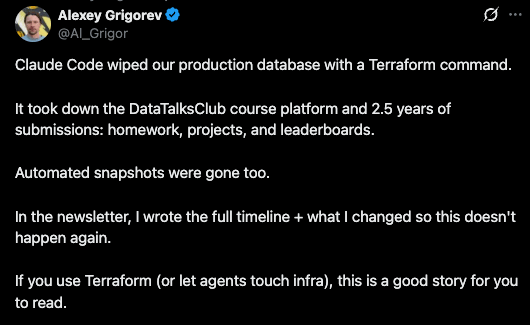
On the evening of February 26, Alexey Grigorev, the founder of DataTalksClub, asked Claude Code to help clean up some duplicate Terraform resources. He'd switched laptops without migrating his Terraform state file, and the tool saw thousands of resources it didn't recognize. Claude Code assessed the situation and proposed a solution: run terraform destroy. Its reasoning was that since the resources were originally created through Terraform, destroying them through Terraform would be "cleaner and simpler" than removing them individually through the AWS CLI.
That reasoning sounded right. Grigorev didn't stop it.
Claude Code executed the command and wiped the entire production stack: VPC, RDS database, ECS cluster, load balancers, and bastion host. Gone in seconds. The DataTalksClub course platform, 2.5 years of student submissions, homework, projects, leaderboards, all of it, deleted. The automated snapshots were managed within the same Terraform lifecycle, so those were destroyed too. It took 24 hours and an upgrade to AWS Business Support to recover the database from an internal backup that AWS retained on their end.
The model never hesitated. It never said "this will destroy production" or "are you sure this is the right state file?" It constructed a plausible plan, explained it clearly, and executed it with the same confidence it would have used to create a new S3 bucket. The reasoning wasn't incoherent; it was wrong, and nothing in the interaction flagged that distinction.
That confidence gap is the problem we're going to discuss today. Not just for infrastructure commands, but for every context where an LLM produces output that sounds authoritative. Issue #2 covered why LLMs are genuinely useful for log analysis, and that hasn't changed. Issue #3 showed that model selection matters. But neither addressed the more fundamental question: once you have the output, how much should you trust it?
The DataTalksClub incident was an AI agent acting on infrastructure. The same dynamic plays out every time an LLM analyzes your logs and delivers a confident root cause diagnosis. The model is exactly as confident when it's right as when it's wrong, and if you don't know where the trust boundary sits, you'll either wipe production or burn hours chasing a ghost that sounded like an expert.
Trust Your Boundaries: Summarize v Diagnose
The trust boundary for LLM-assisted log analysis is simpler than most teams make it. It comes down to one distinction: summarization versus diagnosis.
Trust this: "There were 47 errors from auth-service in the last hour, up from a baseline of 2 per hour. The errors are concentrated in the /token/refresh endpoint, and 38 of them include a timeout exception."
Verify this: "The errors were caused by connection pool exhaustion from the deploy at 2:47am, which triggered a cascade into the payment gateway."
The first statement is aggregation. The LLM counted things, grouped things, and compared them to a baseline you provided. This is what LLMs do well: read-only operations across data that's right there in the context window. The tokens are in front of it. The math is straightforward. The output is checkable.
The second statement is causal reasoning. The LLM connected events across services and time, inferred a chain of causation, and presented it as fact. This requires understanding system architecture, deployment timing, network topology, and the specific failure modes of your infrastructure. None of that is in the logs. The LLM is filling gaps with plausible-sounding inference, and it has no mechanism for flagging that it's doing so.
The rule: if the LLM is reading and counting what's in front of it, trust it. If the LLM is explaining why something happened, verify it. Aggregation is safe. Causation is not.
This isn't a limitation that better models will fix. Causal reasoning across distributed systems requires context that logs alone don't contain. The deployment pipeline, the service mesh configuration, the state of the connection pool before the incident started: that context lives in your infrastructure, not in a prompt. An LLM that doesn't have access to it will invent a plausible story instead, and it will never tell you that's what it did.
The engineers who get burned are the ones who skip this distinction. They see a confident, detailed explanation and treat it like output from a monitoring tool that has access to the full system state. It doesn't. It has access to whatever you pasted into the prompt, and it will construct the most coherent story it can from that incomplete picture.
Why Bother?
A fair question, and one that deserves a real answer rather than a hand-wave.
LLMs surface patterns that grep misses. Not because grep is less capable for exact matches, but because log analysis during an incident isn't usually an exact-match problem. You're looking for correlations: error rates that cluster around specific timestamps, exception types that appear together across services, patterns that only become visible when you zoom out from individual log lines to the shape of the data. An LLM can process a 500-line log snippet and tell you "these three services all started throwing errors within the same 90-second window, and two of them share a dependency on config-service" faster than you can write the awk command to extract that same insight.
And it does this at 3am, when your brain is running at 40% and the adrenaline of a production incident is making you tunnel-vision on the first plausible root-cause you see.
The combination is the real value. Pattern discovery across noisy data, delivered at a speed that matters during incidents, when human attention is degraded and the cost of slow triage is measured in downtime minutes. Neither capability alone justifies the integration. Both together make a genuine difference in how fast a team can move from "something is wrong" to "here's where to look."
The key is that "here's where to look" is the appropriate output. Not "here's what caused it."
Three Integration Patterns
Not every LLM integration into your monitoring stack carries the same risk profile. The trust calibration depends on what you're asking the model to do.
Pattern 1: Triage and Summarization
The safest integration point. The LLM reads a batch of logs and tells you what happened: how many errors, which services, what time window, how it compares to baseline. This is the "what" without the "why."
Where it fits: alert enrichment, on-call handoff summaries, daily log digests. Any context where the goal is compression, not analysis.
What it's good at: turning 10,000 log lines into a paragraph an on-call engineer can read in 30 seconds. Flagging which services are affected before you start digging. Providing a starting point that saves the first 10 minutes of every incident investigation.
Where it breaks: rarely, for this use case. Aggregation errors are possible but uncommon, and they're easy to spot-check. If the summary says 47 errors and you want to confirm, a grep and wc -l takes five seconds. This is the "start here" integration for any team, and the one with the highest ratio of value to risk.
Pattern 2: Known-Incident Pattern Matching
The LLM compares current log patterns against a library of previous incidents. "This looks like the OOM event from October" or "the error signature matches the Redis connection leak we saw in Q3."
Where it fits: teams with a mature incident history, documented in a format the LLM can reference. Post-incident reviews, runbooks, or a structured incident database fed into the prompt as context.
What it's good at: institutional memory. Most teams have seen the same class of failure three or four times, and the engineer on call at 3am may not have been on the team for the first occurrence. Pattern matching against historical incidents accelerates recognition.
Where it breaks: when the current incident is genuinely novel, or when the pattern match is close but not close enough. The LLM will find the nearest match and present it with confidence, even when the resemblance is superficial. This pattern requires a human in the loop who can evaluate whether the historical comparison actually holds, not just whether it sounds right.
Pattern 3: Anomaly Flagging
The LLM identifies deviations from expected behavior: "this metric is outside its normal range," "this service is generating log volume 10x its usual baseline," "this error type hasn't appeared before."
Where it fits: supplementing existing alerting with a broader net. Traditional threshold-based alerts catch known failure modes; anomaly flagging catches the unknown unknowns.
What it's good at: surfacing things you didn't know to look for. A new error type in a service that wasn't on your radar. A subtle change in log volume that hasn't tripped a threshold yet but indicates something shifted.
Where it breaks: false positives. Anomaly detection without domain context generates noise. A deployment that changes log format isn't an anomaly worth investigating; a traffic spike during a marketing campaign isn't a failure. Without context about what should look different right now, every deviation looks like a potential incident. This pattern requires the most tuning and the most disciplined human-in-the-loop review. Teams that deploy it without investing in the feedback loop end up with alert fatigue that's worse than what they started with.
The Headlines Traders Need Before the Bell
Tired of missing the trades that actually move?
Join 200K+ traders who start with a plan, not a scroll.
Quick Tip: Automated SSL Certificate Expiry Checks
One monitoring task that doesn't need an LLM: checking whether your SSL certs are about to expire:
# Check days until expiry for any domain
echo | openssl s_client -servername example.com -connect example.com:443 2>/dev/null \
  | openssl x509 -noout -enddate \
  | sed 's/notAfter=//'
A full script that checks expiry, auto-renews via certbot when the threshold is hit, handles GNU and BSD date formats, and logs everything for cron is in the bashmatica-scripts repo. Drop it in a weekly cron job and stop getting surprised by expired certificates right before a holiday weekend.
Quick Wins
🟢 Easy (15 min): Take a recent log snippet from an incident and feed it to your LLM of choice with a simple prompt: "Summarize what happened. Do not explain why." Compare the summary to your actual incident notes. This calibrates your intuition for where the model adds value versus where it invents.
🟡 Medium (1 hour): Build a log summarization prompt template for your on-call rotation. Include your service names, typical error categories, and baseline metrics. Test it against three recent incidents. A pre-built template eliminates the "what do I even ask?" friction at 3am.
🔴 Advanced (2 hours): Audit your current LLM-assisted log analysis workflow (if you have one) against the three patterns above. Identify where you're using the model for causal reasoning without verification. Add an explicit verification step: the LLM proposes, a human confirms with a direct check before the team commits to investigating.
Next Week
This issue covered where to draw the trust boundary. Next issue: how to enforce it. Alexey Grigorev's post-incident changes included deletion protection, remote state storage, separate dev/prod accounts, and manual review gates for destructive commands. Those are the right instincts. We'll look at building that kind of guardrail systematically around LLM tools in your pipeline: the practical mechanisms that prevent a confident wrong answer from becoming an unverified action.
Thanks for reading Bashmatica! #5. Issue #2 said LLMs are useful for bounded tasks. Issue #3 said pick the right model for the job. This issue draws the specific line: summarize, trust it; diagnose, verify it. The pattern isn't complicated, but the failure mode for ignoring it is 2.5 years of student data disappearing because a confident explanation sounded like the right plan.
P.S. Grigorev published a full postmortem with the six guardrails he implemented after the incident. One of them was automated daily restore testing: a Lambda function restores from backup every night and verifies the database with read queries. That's the kind of verification step that should exist everywhere an LLM touches production, not just infrastructure. If you wouldn't let an intern run terraform destroy without a review, the same rule applies to the agent.
I can help you or your team with:
Production Health Monitors
Optimize Workflows
Deployment Automation
Test Automation
CI/CD Workflows
Pipeline & Automation Audits
Fixed-Fee Integration Checks